How Thermal Printers Improve Queue Management Systems
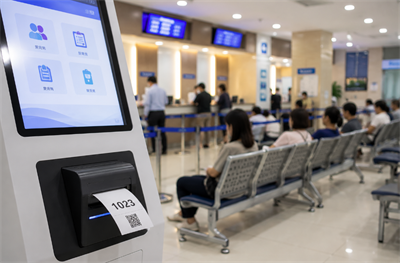
If you've ever stood in a long line at a bank, hospital, or government office, you probably noticed the little ticket that gives you a number. It seems simple enough, but behind that tiny slip of paper is a surprisingly important piece of technology: the thermal printer. These printers do more than print numbers—they drive efficiency, reduce errors, and make the whole queue management system actually work.
Why Are Queue Management Systems Important in Banks, Hospitals, and Government Offices?
Queue management systems aren't just about keeping people in line. They're about speed, fairness, and making sure services run smoothly. When a bank has a surge of customers or a hospital is processing hundreds of patients, delays can happen fast. That's where thermal printers come in—they deliver fast, reliable tickets that keep everything moving.
And it's not just about printing numbers. A well-integrated queue management printer ensures that each ticket corresponds to the right service, the right counter, and the right patient or customer. When this fails, chaos ensues, and staff spend time fixing problems instead of helping people.
How Do Thermal Printers Integrate With Ticket Dispensing Systems?
A thermal printer is the physical endpoint of a digital system. Here's roughly how it works in a kiosk or ticketing system:
1. The system generates a call number or ticket ID.
2. The thermal printer for queue management prints the ticket, sometimes with time stamps or department information.
3. The ticket is handed or dispensed to the user.
4. Each scan at the service counter updates the system in real time.
It sounds straightforward, but if the printer jams, prints illegibly, or is too slow, the whole workflow slows down. This is why selecting the right queue ticket printing solution is crucial.
What Features Should a Thermal Printer Have for Queue Management?
Not all printers are created equal, and queue systems have some specific needs:
· Speed – Tickets need to print fast, especially during peak hours.
· Legibility – Numbers, barcodes, or QR codes must be clear so scanners can read them.
· Easy Maintenance – Easy-loading paper rolls save staff time and reduce errors.
· Compatibility – The printer should work seamlessly with kiosks, POS systems, or call number software.
· Durability – Continuous printing can wear down mechanisms; industrial-grade thermal printers are often preferred.
A well-chosen printer balances these factors, making sure users get a smooth experience and staff don't spend all their time troubleshooting.
How Do Thermal Printers Improve Efficiency and Customer Experience?
Printing a ticket in under two seconds might not seem like a big deal, but multiply that by hundreds of customers, and the difference is huge. Reliable thermal printers ensure that tickets are printed consistently, reducing the chance of misreads or repeated numbers.
For example, a busy hospital using a hospital queue printer can keep patients flowing through registration and triage without long waits or mix-ups. Similarly, banks with high traffic counters rely on thermal ticket printing to maintain order during peak hours. Fast, legible tickets mean customers know where to go, and staff can focus on helping rather than correcting errors.
What Are Common Challenges When Using Thermal Printers in Queue Systems?
Even with the right hardware, issues can pop up:
· Paper jams or misfeeds
· Poor-quality printing leading to unreadable tickets
· Printer downtime during peak hours
· Communication glitches with the queue management software
Choosing a printer that's easy to maintain and designed for continuous use in a kiosk or POS environment mitigates these risks. Features like auto-cutter mechanisms and precise paper feed systems help reduce wasted tickets and minimize operator intervention.
How to Choose the Right Thermal Printer for Your Queue System
When evaluating printers, consider these points:
· Resolution – At least 203 dpi for small text or barcodes.
· Printing Speed – Supports the volume of your busiest service hours.
· Paper Handling – Easy-loading mechanisms and reliable feeding.
· Durability – Can withstand hundreds of prints per day without frequent maintenance.
· Integration – Works with your software and kiosk or POS terminals.
A printer meeting these requirements ensures that the queue system operates efficiently and that tickets remain readable from print to scan.
The Future of Thermal Printing in Queue Management
Queue systems are evolving, and so are thermal printers. Newer models offer:
· IoT connectivity – For real-time monitoring of printer status
· Remote diagnostics – Reduce downtime by detecting issues early
· Higher speed and precision – Keep up with crowded environments
· Compact, modular designs – Fit into slim kiosks or multi-function POS terminals
Even as digital systems advance, the thermal printer remains the physical link between the system and the user, making its reliability and integration essential.
Recent posts
Previous article