Thermal Printhead Life: How Long Does It Last and What Affects It?
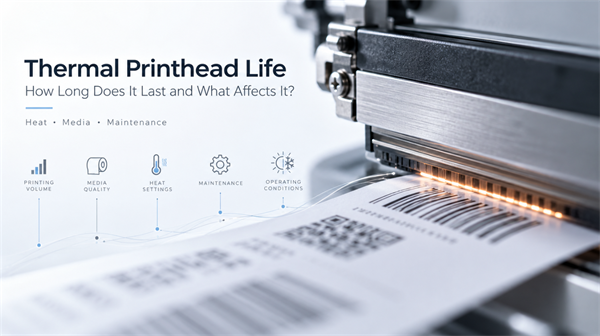
A thermal printhead does not have a fixed lifespan. How long it lasts depends on printing volume, media quality, heat settings, maintenance, and operating conditions. Understanding how printhead life is measured, what causes premature wear, and when to clean or replace the component can help you maintain print quality and control operating costs.
How Is Thermal Printhead Life Measured?
Thermal printhead life is often specified by the linear distance printed, rather than by years of use or the number of labels produced. However, manufacturers may use different specifications and test conditions, so ratings should not be compared without checking the relevant product documentation.
For example, the HPRT TP806 high-performance 80mm thermal receipt printer has a rated printhead life of 150 km. Actual service life depends on workload, media, print settings, and maintenance practices.
Thermal printheads also come in different designs for receipt and label printers, among other applications. For an overview of the main classifications, see our guide to Types of Thermal Printheads.
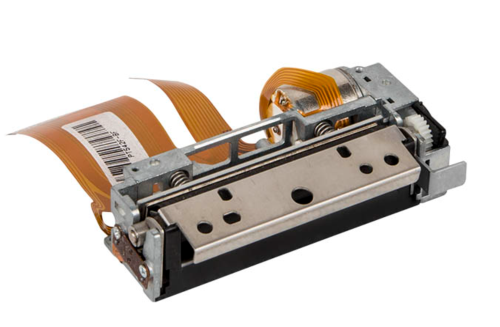
It is also important to distinguish printhead lifespan from duty cycle. Duty cycle describes the workload a printer is designed to handle under specified conditions; it does not guarantee how long the printhead will last.
For a reliable estimate, check the manufacturer's specifications for your exact printer or printhead model and consider your actual operating conditions.
What Causes a Thermal Printhead to Wear Out Faster?
Several factors can accelerate printhead wear or cause printing defects that resemble printhead failure.
• Excessive heat settings: Using a higher darkness setting than necessary can increase thermal stress. Set the lowest darkness level that still produces clear, scannable output.
• Abrasive media and contamination: Rough label surfaces, paper dust, and adhesive residue can wear the printhead or interfere with consistent printing.
• Poorly matched ribbons and labels: In thermal transfer printing, unsuitable ribbon and media combinations may cause residue, inconsistent output, or unnecessary wear.
• Mechanical problems: A worn or contaminated platen roller, incorrect printhead pressure, or an uneven media path can contribute to inconsistent print quality and localized wear.
• Improper handling: Static discharge, scratches, and unsuitable cleaning tools can damage sensitive printhead elements.
Direct thermal and thermal transfer printers also use different media configurations. Neither technology guarantees longer printhead life in every application. The quality of the consumables, printer design, settings, and maintenance all matter.
How Can You Extend Thermal Printhead Life?
Good maintenance practices can reduce avoidable wear and help preserve consistent print quality.
• Use appropriate print settings. Avoid unnecessarily high darkness or heat settings. Adjust speed and darkness according to the media, printer specifications, and required barcode quality.
• Choose compatible consumables. Use labels and, where applicable, ribbons that match the printer's requirements. Abrasive materials and unsuitable combinations can increase wear or leave residue.
• Clean the printhead regularly. Follow the cleaning interval and procedure specified for your printer. For example, Zebra's ZT400 Series maintenance guidance bases recommended intervals on the printing mode and media used, and notes that some applications require more frequent cleaning.
• Inspect related components. Check the platen roller, media path, and other relevant parts for residue, damage, or uneven wear. Problems elsewhere in the printing system can affect output quality and put additional strain on the printhead.
Before cleaning, follow the manufacturer's safety instructions, switch off the printer if required, and allow the printhead to cool. Use only approved cleaning materials and methods.
How Can You Tell Whether a Printhead Needs Cleaning or Replacement?
Poor print quality does not automatically mean the printhead has reached the end of its service life. Start by identifying the symptom and checking other possible causes.
Symptom | Possible cause | Recommended action |
White lines in the same position | Contamination or damaged heating elements | Clean the printhead and test again |
Faded or uneven printing | Incorrect settings, unsuitable media, or component wear | Check settings, consumables, and the platen roller |
Inconsistent barcode readability | Print quality issues, incorrect sizing, or other printing problems | Check the label format and settings, then test with a scanner |
Defects that persist after proper cleaning | Possible damaged printhead elements | Inspect the printhead and consider replacement |
If the same defects remain after cleaning and checking the consumables and settings, the printhead may have physical or electrical damage. Consult the printer manufacturer's troubleshooting guidance or a qualified service provider before replacing it.
For barcode applications, check that the printed codes can be read reliably.
Do DPI, Brand, Price, or Warranty Determine Printhead Life?
When comparing thermal printers or replacement printheads, consider these factors alongside your printing needs, maintenance costs, and expected workload.
✔️ 203 dpi vs. 300 dpi: For standard 4 × 6-inch shipping labels and most warehouse labels, 203 dpi is usually sufficient. For small labels, fine text, or compact 2D barcodes, 300 dpi may be a better choice. Higher resolution doesn't automatically mean longer printhead life, so choose based on your actual print requirements.
✔️ Brand comparisons: Replacing a printhead? Check the exact printer model and compatible part number first. Comparing printers? Ask manufacturers about rated printhead life, test conditions, replacement costs, and spare-part availability. For busy warehouses, quick access to replacement parts can help minimize downtime.
✔️ Low-cost vs. premium: Compare compatible replacement printheads based on more than the purchase price. For high-volume operations, consider replacement costs, maintenance requirements, and potential downtime. Check spare-part prices and lead times before purchasing.
✔️ Warranty coverage: Check whether the printhead has separate warranty terms from the printer. Some warranties exclude normal wear or limit coverage for printheads. Confirm the coverage period, exclusions, and any maintenance records required for claims.
To get the most from your thermal printhead, use compatible consumables, maintain appropriate print settings, and follow the recommended cleaning schedule. Investigate persistent print defects early, and consider replacement costs and spare-part availability when planning maintenance. These steps can help reduce avoidable wear and minimize downtime.