Panel Mount Printers: Integration, Applications & Selection Criteria
In the world of industrial design and embedded systems, the Panel Mount Printer is a critical component. Unlike standalone desktop units, these printers are engineered to be integrated directly into the faceplate or casing of a larger device.
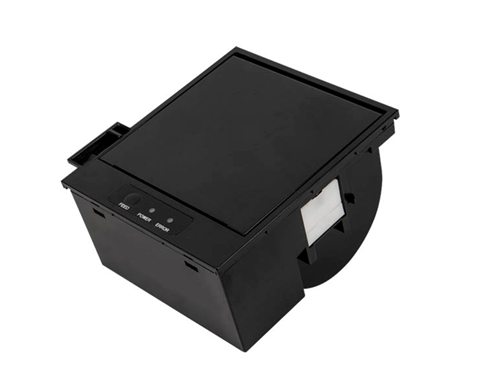
Whether for medical instrumentation, industrial control panels, or diagnostic equipment, selecting the right panel mount thermal printer is essential for ensuring reliable data logging and a seamless user experience. This guide covers the definitions, key applications, and technical specifications required for successful integration.
What is a Panel Mount Printer?
A Panel Mount Printer is a compact thermal printing unit designed to snap or screw into a specific cutout on an equipment panel. It is a "complete" embedded solution, typically consisting of:
1. The Thermal Printer Mechanism: The core engine that prints.
2. The Controller Board: Manages data and print logic.
3. The Housing/Bezel: A plastic or metal faceplate that sits flush with the host device, usually featuring a paper door and an LED status indicator.
The primary advantage of a panel mount printer is ease of integration. Instead of designing a custom housing for a raw print mechanism, engineers can simply cut a rectangular hole in their device and slot the printer in, saving significant R&D time.
Key Applications and Use Cases
Panel mount printers are ubiquitous in industries where on-the-spot data recording is required but space is limited.
• Medical Devices: Used in autoclaves, sterilizers, and ECG monitors to print sterilization records or patient vitals instantly.
• Industrial Automation: Integrated into HMI (Human-Machine Interface) panels to print production logs, error reports, or shift summaries.
• Test & Measurement: Found in breathalyzers, particle counters, and battery testers to provide immediate physical proof of test results.
• Transportation: Used in taxi meters and truck tachographs for fare receipts and driving logs.
Critical Specifications for Selection
When sourcing a panel mount printer, procurement managers and engineers must evaluate four specific criteria to ensure compatibility with the host system.
1. Paper Width and Roll Diameter
The two industry standards are 58mm (2-inch) and 80mm (3-inch).
• 58mm: The most common for data logging and simple text receipts. It is compact and energy-efficient.
• 80mm: Used when more data, charts, or larger fonts are required.
• Note: Always check the maximum roll diameter the housing can accommodate. Many compact panel printers can only fit small rolls (30mm-40mm diameter).
2. Communication Interfaces
The printer must communicate seamlessly with the host MCU (Microcontroller Unit).
• RS232 / TTL: The standard for legacy industrial equipment and simple microcontrollers.
• USB / Mini-USB: Increasingly common for modern medical devices and PC-based systems.
• Parallel: Rare today but still required for some legacy replacement parts.
3. Power Supply Voltage
• 5V - 9V: Typical for portable or battery-operated devices.
• 12V - 24V: Standard for heavy industrial machinery. Matching the voltage is crucial to prevent overheating or under-powered printing (fading).
4. Paper Loading Mechanism
For end-users, the "Easy Loading" (or Clamshell) design is preferred. This allows the operator to simply open the faceplate, drop in a new roll, and close the lid. Older designs required feeding paper through a slot, which can be frustrating in fast-paced environments.
Panel Mount vs. Kiosk Printers: What’s the Difference?
A common point of confusion in search queries is the difference between panel mount and kiosk printers.
• Panel Mount Printers are designed to be accessible from the front. The user interacts with the printer directly on the device's surface. They generally have lower paper capacity.
• Kiosk Printers are mounted inside a machine. The user only sees the paper exit slot. They are designed for high-volume rolls (large diameter) and often include auto-cutters, which are less common on small panel mount units.
Installation and Maintenance
To ensure longevity and print quality:
• Cutout Precision: Manufacturers provide a precise "cutout dimension." If the panel hole is too loose, the printer will rattle; if too tight, the housing clips may snap.
• Print Head Cleaning: Because these printers are often used in dusty industrial environments, the thermal head should be cleaned periodically with an isopropyl alcohol pen to prevent white lines (dead spots) on the printout.
• Tear Bar vs. Auto Cutter: Most panel mount printers use a serrated tear bar to save space and reduce failure points. If an auto-cutter is required, ensure the device depth can accommodate the extra motor bulk.
The panel mount printer remains the gold standard for adding hard-copy capability to professional equipment without increasing the device's footprint. By focusing on the interface (RS232 vs. USB), voltage requirements, and the ease of the "drop-in" paper loading system, engineers can select a robust solution that enhances the functionality of their final product.