Line vs. Serial Thermal Printer Mechanisms: Which One Really Fits Your Design
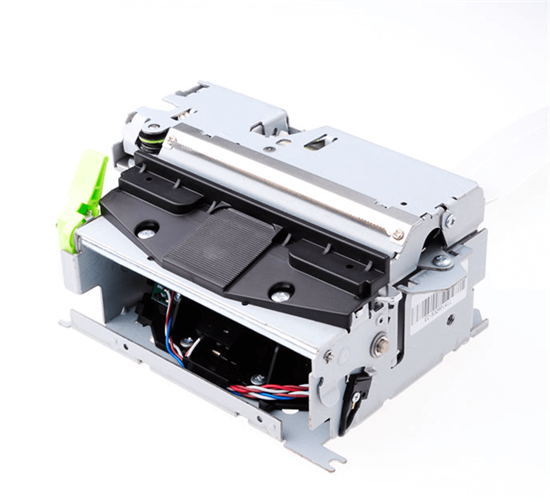
In your next print project, choosing the right thermal printer mechanism can mean the difference between smooth operation and endless troubleshooting. Line vs Serial — which mechanism really fits your design? This guide explains how each works, where they excel, and how to choose the one that fits your needs best.
What Are Line and Serial Thermal Printer Mechanisms?
Every thermal printer relies on a print head and a media feed. What separates line from serial mechanisms is how those two move — or don’t.
Line Thermal Printer Mechanism (Full-Width Design)
In a line-type thermal printer, the print head spans the full width of the paper — often 58 mm, 80 mm, or even 112 mm. It stays fixed while the paper advances underneath, printing one full line in a single burst of heat.
That’s why line mechanisms dominate POS printers, kiosks, and barcode labelers. They’re fast, stable, and built for continuous duty.
Serial Thermal Printer Mechanism (Moving-Head Type)
A serial-type printer works differently. Its head is narrow — just a few dots wide — and slides horizontally across the media, printing column by column (or dot by dot). The paper advances slightly after each pass.
This moving-head design is slower but far more compact. It powers portable, battery-driven printers where every millimeter and milliamp count.
How Line and Serial Thermal Printer Mechanisms Work
Both designs use the same key parts — a thermal print head, platen roller, motion motor, and sensors. The difference lies in what moves during printing.
Line-Type Process
• The paper aligns under a stationary, full-width head.
• The controller energizes thousands of heater dots simultaneously — one crisp line at a time.
• The paper advances, ready for the next line.
No lateral movement. Minimal wear. Blistering speed.
Serial-Type Process
• The head starts at one side of the paper.
• It moves horizontally, firing tiny groups of dots column by column.
• Once one row is complete, the paper steps forward for the next.
More motion. More precision control. Slightly slower throughput.
Line vs. Serial: Side-by-Side Comparison
Feature | Line-Type Thermal Mechanism | Serial-Type Thermal Mechanism |
Print Width | Full media width (58 mm – 112 mm+) | Narrow or variable |
Speed | 200 – 300 mm/s (fast) | 50 – 150 mm/s (moderate) |
Mechanical Complexity | Very low | Higher (moving carriage) |
Power Usage | Medium to high | Low (smaller head, motor) |
Size & Weight | Larger | Compact, lightweight |
Best For | POS, kiosks, high-volume labels | Portable & handheld printers |
Durability | High, few moving parts | Moderate, moving parts wear |
Cost | Slightly higher | Lower for small formats |
Key takeaway:
• If speed and uptime drive your project, go line-type.
• If portability, power efficiency, or tight space matters more, serial-type wins.
When to Use Line Thermal Printer Mechanism
Line thermal mechanisms thrive anywhere that throughput and reliability are non-negotiable — ticketing machines, self-checkout kiosks, logistics labelers.
They print full lines instantly, require almost no maintenance, and handle millions of cycles without degradation.
Manufacturers like Epson and Seiko Instruments market these “full-line” heads as benchmarks for industrial-grade printing performance.
In practice, engineers pick line-type when printing wide, fast, and often.
When to Use Serial Thermal Printer Mechanism
If your product lives in someone’s hand or backpack, the serial-type mechanism is your ally.
It fits tight spaces, sips power, and still produces sharp 203 – 300 dpi prints — good enough for receipts, QR codes, and simple labels.
You’ll find this design inside mobile receipt printers, handheld terminals, and small photo printers.
The trade-off? Speed. But if your print jobs are short, you’ll hardly notice.
Common Confusion: Mechanism ≠ Print Method
Many confuse mechanism type (line or serial) with print method (direct thermal vs. thermal transfer).
Here’s the quick fix:
• Direct thermal: paper coated with heat-sensitive dye; no ribbon.
• Thermal transfer: ribbon melts ink/resin onto the surface.
Mechanism type only describes thermal printing motion — how the print head and media move, not how color appears.
Choosing in 30 Seconds: A Practical Checklist
Ask yourself:
• Need continuous high-speed printing? → Line-type
• Battery-powered or pocket-sized design? → Serial-type
• Printing wide receipts or labels? → Line-type
• Tight budget or limited space? → Serial-type
• Expect heavy daily use? → Line-type again
You can decide just by knowing your use case + power constraints + duty cycle.
FAQs About Line and Serial Thermal Printer Mechanisms
Q1: Is line-type always better?
No. It’s better for volume and speed, but serial shines in portable, low-power devices.
Q2: Can serial-type reach 300 dpi or more?
Yes — resolution depends on head design, not motion system. It just prints slower at higher dpi.
Q3: Do they require different maintenance?
Slightly. Line-type: clean head and platen periodically.
Serial-type: also check carriage rails and motor for wear.
The Bottom Line
Both mechanisms have stood the test of time. Think of it this way —
If you print hundreds of labels a day, speed wins.
If your printer fits in a pocket, size wins.
Pick the mechanism that matches your reality, not the spec sheet.