Desktop vs Industrial Barcode Printers: Which One Fits Your Operation?
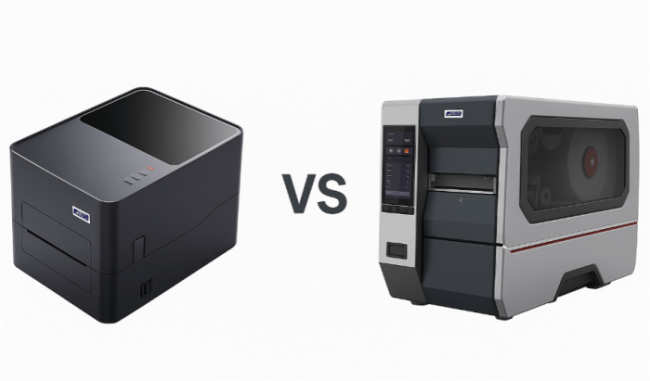
When it comes to running an efficient business—whether it’s a small retail shop or a large-scale warehouse—your barcode printer plays a surprisingly critical role. The wrong choice can slow down operations, cause labeling errors, or cost you more in maintenance than you’d expect. So, should you go for a desktop barcode printer or an industrial barcode printer? Let’s unpack the differences and figure out which one truly fits your workflow.
Understanding the Core Difference
The main distinction comes down to scale and durability. A desktop barcode printer is built for moderate, everyday use. Think retail stores, small offices, or startup warehouses printing a few hundred labels daily. Compact and quiet, these models are designed to fit on your counter or desk—ideal for low- to medium-volume tasks.
An industrial barcode printer, on the other hand, is the workhorse of labeling. It’s designed for high-volume printing, round-the-clock operation, and rugged environments like logistics centers, factories, and distribution hubs. These printers can handle thousands of labels a day without breaking a sweat.
In short: desktop models focus on convenience and cost-effectiveness; industrial models focus on power and performance.
When a Desktop Barcode Printer Makes Sense
If you’re running a small business, a desktop barcode printer is often more than enough. Here’s why:
• Compact footprint: Easy to place in limited spaces like retail counters or back offices.
• Affordable entry point: Great for small businesses just starting out with inventory tracking or POS labeling.
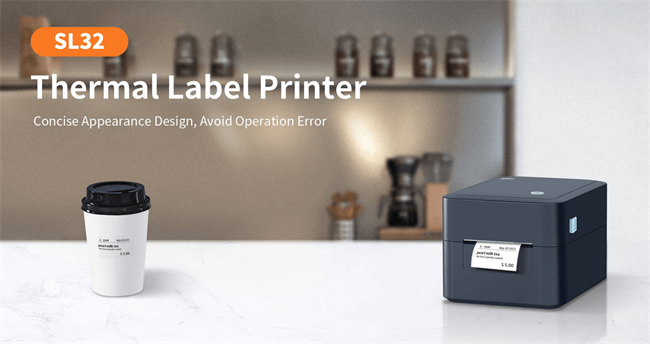
• Sufficient print volume: Perfect for printing a few hundred labels per day.
• Simple operation: Most models are plug-and-play with USB or Wi-Fi connectivity.
For instance, a coffee shop printing daily cup labels or a boutique store managing inventory can rely on a small business barcode printer without overpaying for features they’ll never use.
Interestingly, we often see that many businesses overestimate their print volume needs. If your total labeling requirement is under 1,000 labels a day, a desktop printer is likely your best friend.
When an Industrial Barcode Printer Is Worth It
Once your label printing becomes part of a continuous workflow—say, for logistics, manufacturing, or e-commerce fulfillment—an industrial barcode printer starts to make sense.
Here’s what makes it different:
• High-volume printing: Handles thousands of labels daily with minimal downtime.
• Durability: Built with metal casings and heavy-duty components to withstand heat, dust, and vibration.
• Wider media support: Can print on large rolls, thicker materials, or specialized labels (like synthetic tags or RFID).
• Faster print speeds: Up to 12 inches per second, critical for warehouse operations.
If your team is working in a warehouse environment, the ability to print shipping labels or inventory tags non-stop matters. Every second saved adds up.
According to a logistics efficiency study by Supply Chain Quarterly, companies that upgraded to industrial barcode printers reduced label reprints and downtime by up to 28%, directly improving operational throughput.
Practical Comparison: Desktop vs Industrial Barcode Printer
Feature | Desktop Barcode Printer | Industrial Barcode Printer |
Print Volume | Up to 1,000 labels/day | 5,000–10,000+ labels/day |
Durability | Light use | Heavy use, 24/7 |
Media Size | Small to medium rolls | Large rolls, wide labels |
Environment | Office, retail | Warehouse, factory |
Price Range | Low to moderate | Higher upfront, lower per-label cost |
The key thing to remember is: buy for your workload, not your ambition. A warehouse barcode label printer might sound impressive—but if your actual demand doesn’t match, it’s wasted potential and cost.
Connectivity, Maintenance & Ease of Use
Modern barcode printers—both desktop and industrial—come with versatile connectivity options like USB, Ethernet, Wi-Fi, or Bluetooth. But the maintenance expectations differ.
• Desktop printers: Typically require periodic printhead cleaning and occasional label alignment.
• Industrial printers: Need regular preventive maintenance but offer longer printhead lifespans and easier component replacement.
If you’re integrating printers into an ERP or warehouse management system, industrial models generally offer stronger software compatibility and driver support.
Final Thoughts: Matching Printer to Purpose
So, which one should you choose?
If you’re running a small business or retail operation, go with a desktop barcode printer—it’s affordable, efficient, and simple to manage.
If you’re managing high-volume shipping, manufacturing, or logistics, an industrial barcode printer will pay off through speed, durability, and long-term cost savings.
At the end of the day, your barcode printer is more than a piece of hardware—it’s part of your operational backbone. Choosing wisely means smoother workflows, fewer errors, and better margins.
Because in business, the smallest label can make the biggest difference.