Paper Sensors in a Thermal Printer — Types, Functions, and Examples
Thermal printers do more than quietly roll out receipts and labels. Every thermal printer relies on hidden sensors to guide paper movement and accuracy. The most important is the paper sensor—the small part that makes every print clean and consistent. So, what exactly do paper sensors do, and why do they matter?
Why Paper Sensors Matter in Thermal Printers
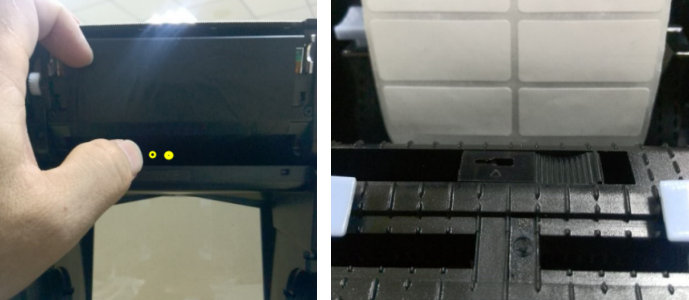
A thermal printer can’t “see” without its sensors. These components detect the presence, position, and type of paper — ensuring the print starts at the right place and stops when it should.
Without them, you’d get skewed labels, wasted paper, or even a burnt printhead. Paper sensors act as the printer’s eyes and nerves, monitoring media movement, head position, and feed accuracy in real time.
The key thing to remember is: the smarter the sensing system, the more consistent your output.
Types of Paper Sensors in Thermal Printers
Every printer mechanism has a slightly different sensor setup. In practice, we often see three to five types of paper sensors working together — each with its own job and detection method.
1. Paper-Out (Paper Presence) Sensor
This is the most basic type. It tells the printer whether paper is loaded or not.
There are two main designs:
• Mechanical switch sensors, which physically detect the presence of paper.
• Optical sensors, which use an infrared beam to sense when paper interrupts the light path.
When no paper is detected, the printer halts — preventing the printhead from overheating or wasting energy.
2. Black Mark Sensor (Reflective Detection)
Used mainly in label or ticket printers, this sensor identifies a black mark printed on the back of media. When the reflective light signal drops, the printer recognizes that mark as the start or end of a label.
This precise detection ensures every label prints in the correct position — no misaligned barcodes, no overlapping labels.
Common in devices like POS ticket printers or shipping label mechanisms, the reflective black mark sensor is key to repeatable accuracy.
3. Gap/Notch Sensor (Transmissive Detection)
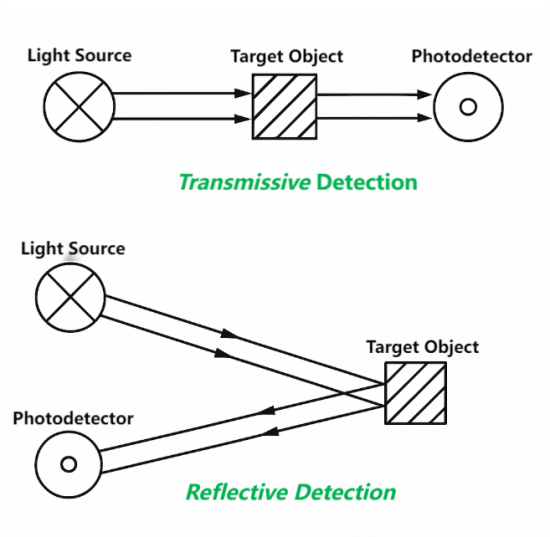
For labels separated by a clear gap or notch, a transmissive sensor is used. It shines light through the media; when the light passes unobstructed through a gap, it signals the label’s boundary.
That’s how thermal label printers know exactly when to stop printing one label and start the next — a must-have for logistics, warehousing, and barcode printing.
4. Printhead Position / Head-Open Sensor
A printhead must be firmly closed for consistent heat transfer. This sensor checks that alignment. If the head isn’t fully locked, the sensor prevents printing — protecting the printhead and ensuring the image isn’t faded or broken.
In portable or mobile printers, this small feature prevents costly mechanical damage caused by vibration or misuse.
5. Temperature / Thermistor Sensor
Technically not a “paper” sensor, but it works closely with the others. This thermistor monitors the printhead’s temperature to prevent overheating.
In practice, consistent temperature control means consistent image density — every barcode or receipt looks just as sharp as the last.
How Paper Sensors Work: Reflective vs. Transmissive
There are two main optical designs behind most paper sensors:
Sensor Type | Detection Principle | Typical Application |
Reflective Sensor | Emits light and measures reflection changes when hitting a black mark or media surface | Used for mark detection on non-transparent paper |
Transmissive Sensor | Emits light through paper; detects light passing or blocked by gaps or holes | Used for transparent label liners or notched tags |
Reflective sensors are compact and cost-effective; transmissive ones are more precise for specialized label stock.
In short: choose reflective for black marks, transmissive for label gaps.
Other Detection Features in Modern Mechanisms
Advanced thermal printer mechanisms now integrate additional sensor logic for accuracy and user safety:
• Paper Width Detection: Measures media width automatically to ensure centered printing.
• Paper Jam Detection: Monitors feed timing and motor feedback to catch jams instantly.
• Leading Edge Detection: Finds the exact start of the label, improving registration accuracy.
These features enhance print quality, reduce waste, and make modern thermal printers smarter than ever.
Choosing the Right Sensor Setup
If you’re designing or selecting a printer mechanism, here’s what matters most:
• Match the sensor type to your media. Black-mark labels need reflective sensors; clear labels with gaps need transmissive ones.
• Think about the environment. Dust, heat, or shock can affect sensor reliability — choose protective housings if needed.
• Don’t skip head-open and temperature sensors. They extend printhead life and reduce maintenance costs.
For mobile printers, compact sensors improve battery efficiency and reduce power draw.
The right combination of sensors determines how smoothly a printer runs — and how long it lasts.
Key Takeaways
Paper sensors may be small, but they’re the foundation of every thermal printer mechanism’s intelligence. They guide the paper, time the heat, and protect the printhead.
When you understand how these sensors work, you gain real control — over print precision, efficiency, and uptime. After all, great printing doesn’t just depend on heat or voltage. It depends on what your printer can see.