Common Barcode Quality Issues and Solutions in Thermal Printing
Barcodes are everywhere—in retail stores, warehouses, hospitals, and delivery hubs. But when barcode quality drops, things go wrong fast. A receipt won’t scan at the checkout. A shipping label slows down a warehouse line. A patient wristband becomes unreadable.
These are the barcode printing problems that cost businesses time and money. In this barcode troubleshooting guide, we’ll look at the most common barcode quality issues in thermal printing, explain their causes, and show you how to fix them.
What affects barcode quality in thermal printing?
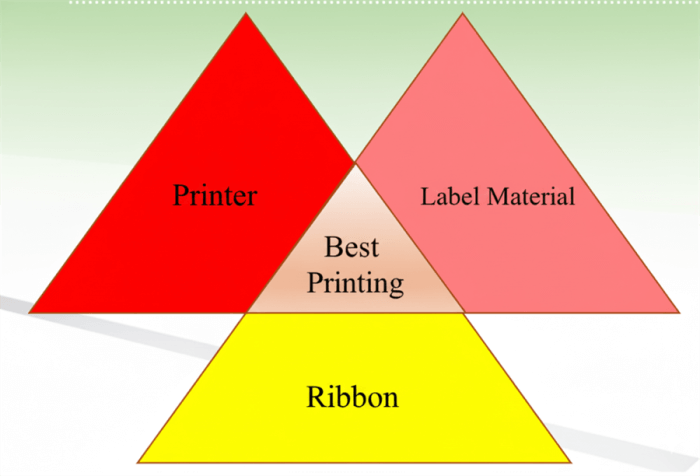
Barcode quality in thermal printing depends on three key factors:
•The barcode printer itself – Printhead condition, platen roller pressure, and settings like density and speed all affect clarity. A worn printhead or incorrect pressure leads to distorted or faded bars.
•The ribbon – In thermal transfer printing, ribbon type matters. Wax, resin, and wax-resin ribbons each perform differently. A mismatch between ribbon and label surface is a common cause of poor barcode quality.
•The label material – Paper, polypropylene, polyester, and coated stocks all react differently under heat. Using the wrong label material often results in smudges, fading, or unscannable codes.
When these three elements—printer, ribbon, and label—are balanced, barcode quality remains sharp and reliable. When one is off, problems start to appear.
Common barcode printing problems and solutions
Barcode printer and label printing quality issues are more common than many expect. Even a small defect—like faded bars, white gaps, or smudges—can make a barcode unreadable.
Here are some common problems and solutions:
1. Faded or too dark barcodes
Causes: Incorrect print density or temperature is usually to blame. Too light, and scanners struggle to read. Too dark, and the bars bleed together.
Fix: Lower the print speed and adjust the density step by step until the image looks sharp. Make sure you’re using the right thermal paper or label stock.
2. White lines or gaps in barcodes
Cause: Dirt or debris on the printhead, or uneven pressure on the platen roller, interrupts contact. This leaves vertical white lines across the barcode.
Fix: Clean the printhead with approved cleaning pens or wipes. Check platen roller pressure and alignment. If streaks persist, the printhead may need replacement.
3. Black line issue
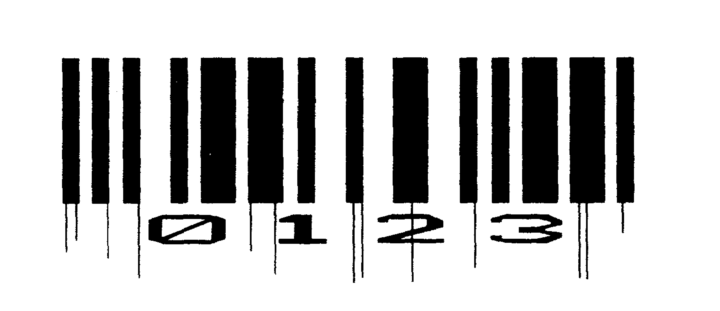
Cause: Printhead buildup in the thermal printer causes irregular, broken, or smudged black lines in the barcode.
Fix: Clean the printhead thoroughly using approved cleaning pens or wipes. If cleaning doesn’t resolve the issue, replace the printhead to restore print quality.
4. Smudged or blurry barcodes (ghosting problem)
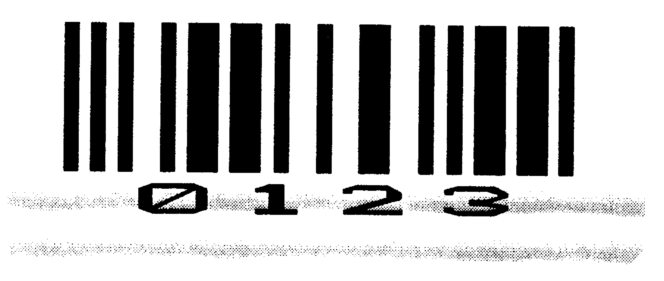
Cause: Ribbon and media speed are not synchronized, ribbon-to-media compatibility is poor, or printhead pressure is incorrect. These mismatches lead to smearing or shadow effects behind the bars.
Fix: Verify printer driver settings and adjust print speed. Try a different ribbon-media combination for better compatibility.
5. Ribbon breakage
Cause: In thermal transfer printers, high heat or incorrect ribbon type (e.g., wax ribbon on synthetic labels) causes breakage.
Fix: Match ribbon type to label stock—wax for paper, resin for synthetics, or wax-resin for general use. Reduce heat and density settings.
Barcode quality isn’t a small detail. A bad print slows lines, frustrates staff, and hurts trust. The fix is often simple—clean the head, use the right ribbon, pick the right label. Do that, and your barcodes scan right the first time, every time.