How to Eliminate Print Defects and Duplicate Labels: A Guide to Barcode Printers with Verifiers
In fast-moving manufacturing and logistics supply chains, defective or unreadable barcode labels can create operational risk, rework, and compliance issues. In sectors such as healthcare, retail, and automotive supply, labeling errors may also lead to chargebacks, production delays, or audit failures.
To reduce these risks, more system integrators and production teams are adopting barcode printers with integrated verifiers. These systems combine an industrial print engine with inline inspection technology, enabling real-time checks during the printing process.
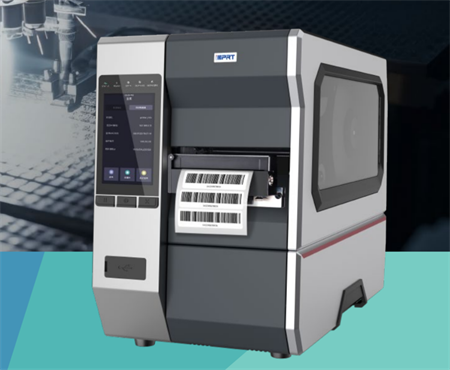
Why Is 100% Inline Barcode Verification Necessary?
Traditional quality control often relies on post-print sampling, where operators manually scan only a small number of labels from each batch. This approach can miss random defects that occur mid-run.
An inline barcode inspection printer checks each label immediately after printing. In practice, this helps detect three common issues:
• Unreadable Barcodes: Caused by damaged thermal printhead elements (clogged dots or blank lines) or insufficient ribbon contrast.
• Missing or Duplicate Labels: Human errors, network interruptions, or mid-run consumable changes can cause print jobs to skip labels or reprint existing serial numbers, creating duplicates.
• Content and Alignment Shifts: OCR and OCV tools can confirm whether human-readable text matches the database and whether the print position remains within the label area.
How Does a Barcode Inspection Printer Handle Print Errors?
When an inline verifier detects a label that does not meet the preset quality criteria, the system can trigger an automatic correction sequence. Depending on the model and configuration, it may:
1. Identify the failed barcode or text element.
2. Stop the media feed or send an alert to the host system.
3. Void the failed label by printing an overstrike pattern, backfeed the media, and print a replacement label automatically.
This closed-loop approach helps reduce manual intervention and lowers the risk of bad labels reaching the supply chain.
Representative Barcode Printers with Verifiers
When selecting an integrated printing and verification solution, two prominent hardware manufacturers offer highly reliable industrial platforms:
1. iDPRT iV8600 Intelligent Vision Printing and Inspection Printer
The iDPRT iV8600 is an integrated printing and intelligent vision inspection system built for high-volume manufacturing, 3C electronics, and healthcare labeling, delivering high performance and excellent cost effectiveness.
It features a built-in vision module that performs 100% real-time inline verification, comprehensively checking for barcode grades, character defects, positional offsets, and background smudges.
On detecting a defect, the system automatically backfeeds, marks the label as invalid (NG), and reprints the correct label. It supports direct integration with MES and WMS databases, allowing batch template importing without requiring manual reference image configuration.
Key Technical Specifications:
Camera Resolution: 600 DPI / 1200 DPI
Maximum Inspection Speed: 14 inches per second (356 mm/s)
Minimum Barcode Resolution: 3 mil (1D) / 5 mil (2D)
Minimum Font Size (OCR/OCV): 3 pt (Supports English, Chinese, Japanese, Korean, and other major scripts)
Label Dimension Limits: Width: 20 mm – 108 mm; Length: 3 mm – 1065 mm
System Connectivity: USB, Ethernet; supports MES/WMS API and database matching
2. TSC Printronix T8000 with ODV-2D Barcode Verification System
The TSC Printronix T8000 with the ODV-2D online verifier is a heavy-duty industrial printer that automatically calibrates, verifies, and grades up to 50 barcodes (1D and 2D) per label.
Operating strictly to ISO/IEC standards, it assigns a quality grade (A to F) to each barcode. If a label falls below the defined threshold, the printer automatically backfeeds, prints an overstrike pattern to void the rejected label, and reprints a replacement. The system also logs and exports verification reports to maintain an audit trail for supply chain compliance.
Key Technical Specifications:
Verification Compliance: Grades 1D and 2D barcodes to ISO/IEC 15415, 15416, and 15426 standards
Maximum Print/Verification Speed: Up to 14 inches per second (356 mm/s) at 203 DPI; 12 ips at 300 DPI
Print Width Configurations: Available in 4-inch, 6-inch, and 8-inch heavy-duty industrial models
Minimum Barcode X-Dimension: Supports verification down to 10 mil (ODV-2D configuration)
System Connectivity & Reporting: Standard Ethernet, USB, and serial interfaces; exports XML/CSV verification data and grading reports via TSC Console Web
Practical View
Inline verification does not replace all quality control steps, but it significantly improves label reliability by moving inspection from sampling to 100% inline checking. For high-volume operations, that can reduce rework, lower compliance risk, and improve throughput.