Barcode Printer Sizes: 2, 3, and 4 Inch Applications
Choosing the right barcode printer sizes can directly impact efficiency, cost, and workflow performance. Whether you are printing small retail labels or large shipping tags, understanding the differences between 2-inch, 3-inch, and 4-inch barcode printers helps you make better operational decisions.
This guide explains how each printer size is used, what industries rely on them, and how to choose the right option based on real-world needs.
Understanding Barcode Printer Sizes
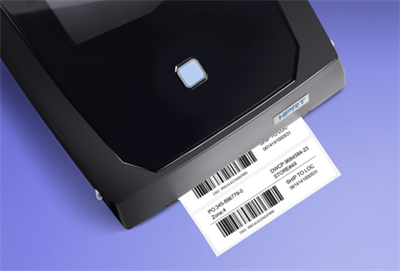
Barcode printer sizes refer to the maximum print width the device can handle. The most common formats are 2-inch, 3-inch, and 4-inch printers, each designed for different label types and business workflows.
What Does 2-inch, 3-inch, and 4-inch Mean?
A 2-inch printer typically prints labels up to about 2 inches wide, while 3-inch and 4-inch printers support wider formats. These sizes correspond to real-world use cases such as shelf labels, inventory tags, and shipping labels.
Label Width vs Print Width Explained
The printer width determines the maximum label size, but actual usage depends on label design and application. Choosing the right size ensures compatibility and avoids operational inefficiencies.
Common Applications of 2-Inch Barcode Printers
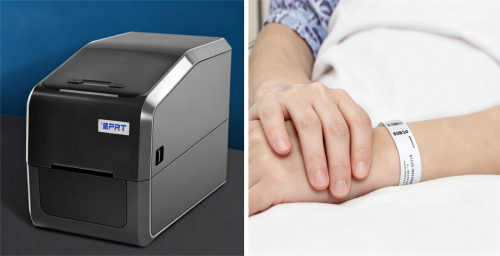
2 inch barcode printer applications are ideal where space is limited and precision is critical.
• Retail price labels and shelf tags
• Healthcare and laboratory labeling
• Jewelry and small asset tracking
These printers are compact, cost-effective, and designed for high-precision, small-format labeling environments.
Where 3-Inch Barcode Printers Are Used
3 inch barcode printer uses are often found in operations that require more flexibility than small-label environments.
• Warehouse inventory labeling
• Product identification labels
• Internal logistics and tracking
This size provides a balance between flexibility and efficiency, making it a practical choice for many mid-scale operations.
Note: Many 2-inch and 3-inch barcode printers are available in portable models. These devices can be connected to smartphones or PDAs for mobile printing, making them especially useful for asset tagging, delivery notes, and even certain shipping label applications.
Typical Use Cases for 4-Inch Barcode Printers
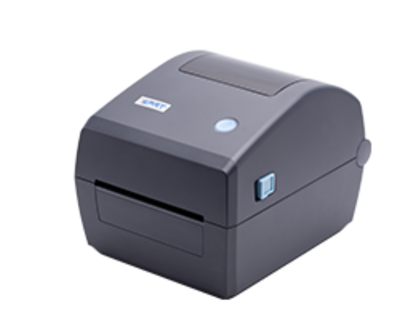
4 inch barcode printer applications are the industry standard for logistics and shipping workflows.
• Shipping labels (4x6 format)
• E-commerce fulfillment operations
• Compliance and large-format labels
These printers support high-volume printing and are essential for businesses handling large-scale logistics or standardized shipping labels.
Key Differences Between 2, 3, and 4 Inch Printers
Printer Size | Typical Use | Industry |
2-inch | Small labels | Retail, healthcare |
3-inch | Inventory labeling | Warehouse, manufacturing |
4-inch | Shipping labels | Logistics, e-commerce |
Understanding these differences helps businesses match printer capabilities with real operational needs.
How to Choose the Right Barcode Printer Size
Knowing how to choose barcode printer size depends on several key factors.
Based on Label Size Requirements
Match the printer to your most commonly used label size. For example, shipping labels usually require 4-inch printers, while retail tags often use 2-inch.
Based on Industry Use Cases
Different industries have different needs. Retail environments prioritize compact labels, while logistics operations require larger, standardized formats.
Based on Volume and Workflow
High-volume environments benefit from larger printers that offer faster output and wider label compatibility.
Desktop vs Industrial Considerations
Desktop printers work well for low to moderate usage, while industrial printers are designed for high-volume, continuous operations.
Common Mistakes When Choosing Barcode Printer Sizes
Avoid these common issues when selecting a barcode printer:
• Choosing based only on price instead of application
• Ignoring future scalability needs
• Mismatch between label design and printer width
These mistakes can lead to inefficiencies and additional costs over time.
Final Thoughts on Barcode Printer Sizes
Understanding barcode printer sizes is essential for aligning your labeling system with real-world workflows. From compact 2-inch printers to high-volume 4-inch systems, each size serves a specific role.
Choosing the right option ensures better efficiency, scalability, and long-term operational success.
FAQs about Barcode Printer Sizes
What size barcode printer is best for shipping labels?
Most shipping labels require a 4-inch barcode printer, especially for standard 4x6 formats used in logistics and e-commerce.
What is the difference between 2-inch and 3-inch printers?
2-inch printers are designed for small labels, while 3-inch printers provide more flexibility for inventory and product labeling.
Can one barcode printer handle multiple label sizes?
Yes, many barcode printers support multiple label sizes within their maximum print width, but choosing the correct base size is still important.
How do I choose the right barcode printer size?
Select based on your label size, industry requirements, and expected print volume to ensure the best fit for your operations.