Best 300 DPI Barcode Printers for Shipping, Retail, and Warehouse Use
If your labels look blurry or scanners struggle to read them, it's usually a resolution issue—not your workflow. For applications like shipping labels, QR codes, or small asset tags, a 300 dpi barcode printer makes a noticeable difference in clarity and scanning reliability.
This is why many businesses upgrade from 203 dpi to 300 dpi when label precision becomes critical. Below, we recommend three printers suited to different business needs: budget shipping, all-around desktop use, and warehouse operations.
Why Choose a 300 DPI Barcode Printer?
Compared to standard 203 dpi printers, 300 dpi models provide sharper output, which is especially important when printing:
· Small text and dense barcodes
· QR codes and Data Matrix labels
· Asset tags that must remain readable over time
· Compliance or product identification labels
For businesses dealing with e-commerce shipping, inventory tracking, or manufacturing labeling, this higher resolution reduces scanning errors and improves overall workflow reliability.
Best Budget Option for Shipping: VEVOR 300 DPI Bluetooth Thermal Label Printer
For small businesses and e-commerce sellers, the priority is often affordability and ease of use. The VEVOR 300 dpi Bluetooth thermal label printer is designed for basic shipping label printing without complex setup.
Key Strengths
· Wireless connectivity via Bluetooth for mobile printing
· 300DPI Clear & Stable Printing, no ink, no toner
· Supports 4×6 shipping label, and small product barcodes, DIY labels, address labels, reminder tags and etc
· Compact and easy to deploy in small workspaces
Price: $114.99 (official website)
Real-World Use Case
This printer is best suited for:
· Online sellers printing daily shipping labels
· Home-based businesses
· Small retail operations with low to moderate volume
Considerations
While it performs well for shipping tasks, it is not designed for heavy-duty or industrial environments. Businesses with growing volume may eventually require a more robust system.
Best All-Around Desktop Printer: IDPRT iT4X
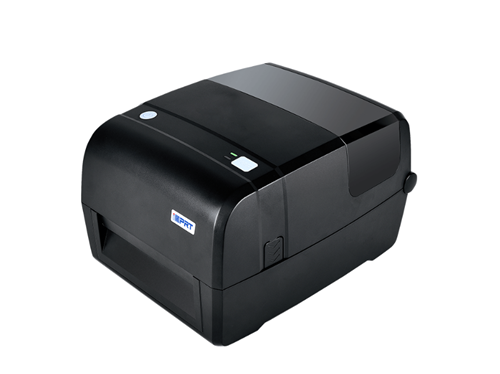
For businesses that need flexibility across different labeling tasks, the IDPRT iT4X stands out as a balanced solution.
Key Features
· Supports both 203 dpi and 300 dpi printing with automatic configuration
· Print speed up to 6 ips at 300 dpi, suitable for daily operations
· Dual transmissive sensors for accurate label positioning
· Large memory (128 MB RAM, 256 MB Flash) for stable performance
· Compatible with multiple barcode formats including QR codes and Data Matrix
Price: CN¥1,428–1,496(market reference price)
Real-World Use Case
The iT4X is ideal for:
· Retail stores printing product labels
· Small warehouses managing inventory
· Healthcare or lab environments requiring clear, precise labels
· Businesses needing both thermal transfer and direct thermal options
Why It Stands Out
This printer works well as an all-purpose solution because it balances:
· Print quality
· Flexibility across media types
· Ease of integration with existing systems
It is a practical choice for businesses that handle multiple labeling scenarios without needing a full industrial setup.
Best for Warehouse and Logistics: IDPRT iX4P
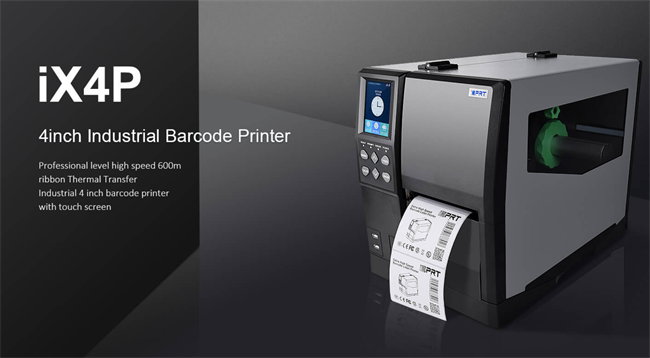
For high-volume environments, stability and speed are critical. The IDPRT iX4P is designed for industrial-level barcode printing.
Key Features
· Supports 300 dpi printing at up to 8 ips, with optional higher 600 dpi resolutions
· Delivers consistent and reliable performance for high-volume printing of warehouse pallet labels, inventory tracking labels, and manufacturing ID tags.
· High-capacity ribbon support (up to 600 meters) for long print runs
· Industrial-grade sensors for accurate and stable operation
· Built-in color display for easier operation
Price: CN¥7,904–7,972 (market reference price)
Real-World Use Case
This model is best suited for:
· Warehouse inventory management
· Logistics and distribution centers
· Manufacturing environments
· High-volume shipping operations
Why It Works for Industrial Use
The iX4P is built for continuous, high-speed printing, where downtime and errors can disrupt operations. Its durability and advanced features make it suitable for demanding workflows.
How to Choose the Best 300 DPI Barcode Printer
Selecting the right printer depends less on brand and more on your specific application scenario.
For Shipping and E-Commerce
· Look for compact, easy-to-use models
· Bluetooth or USB connectivity is often sufficient
· Cost efficiency is a priority
For Retail and General Use
· Flexibility across label sizes is important
· Reliable print quality for barcodes and QR codes
· Moderate speed and durability
For Warehouse and Industrial Operations
· High-speed printing capability
· Support for large media rolls and ribbons
· Strong build quality for continuous use
Final Thoughts
The best 300 dpi barcode printer is not the same for every business. Each of the models above serves a different purpose:
✔ VEVOR is suitable for budget shipping and small operations
✔ IDPRT iT4X offers a balanced solution for mixed-use environments
✔ IDPRT iX4P is designed for high-volume warehouse and logistics workflows
Understanding your operational needs—whether it is shipping, retail labeling, or industrial production—is the key to choosing the right device.
FAQs About 300 DPI Barcode Printers
What is the advantage of 300 dpi over 203 dpi?
A 300 dpi barcode printer produces sharper and more detailed labels, which is important for small text, QR codes, and high-density barcodes.
Is a 300 dpi printer necessary for shipping labels?
For standard shipping labels, 203 dpi is often sufficient. However, 300 dpi improves clarity and scanning reliability, especially for smaller or more detailed labels.
Which industries benefit most from 300 dpi barcode printers?
Industries such as logistics, manufacturing, healthcare, and retail benefit from higher-resolution printing for better traceability and accuracy.
Can one printer handle different applications?
Yes, versatile models like desktop barcode printers can handle multiple use cases, but high-volume environments may require dedicated industrial machines.
Recent posts
Previous article