How to Choose a Thermal Printer Mechanism for Kiosk Terminals
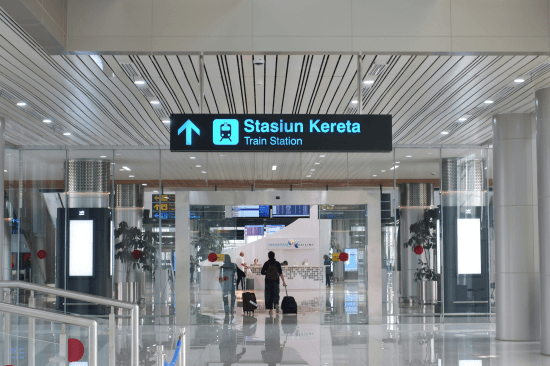
Walk into any train station, hospital, or parking lot, and you’ll likely find a kiosk terminal quietly doing its job—printing tickets, receipts, or queue numbers without human help. At the center of that process is one essential part: the thermal printer mechanism. It’s what turns data into printed paper in seconds. With so many models and specs available, choosing the right one for your kiosk can be trickier than it seems.
Why Kiosk Terminals Use Thermal Printer Mechanisms
Let’s be honest—kiosks don’t have the luxury of daily maintenance. They need to work around the clock, often in harsh environments. That’s where thermal printer mechanisms shine.
No ink. No ribbons. No mess. Just clean heat-based printing that runs quietly and consistently.
A good thermal printer mechanism offers speed, reliability, and simplicity. It’s compact enough to fit into tight kiosk housings yet powerful enough to print hundreds of tickets per day without failure. The best part? Minimal wear and tear. You can run them for months, even years, with almost no downtime.
That’s why nearly every modern kiosk printer relies on thermal printing technology—it simply makes practical sense.
Key Factors to Consider When Choosing a Thermal Printer Mechanism
Now that we know why thermal printer mechanisms dominate kiosk terminals, the real question is: how do you choose the right one?
Below are the essential points you need to weigh before making that decision.
1. Printing Speed & Resolution
Speed isn’t just a luxury—it’s part of the user experience.
Imagine someone waiting at a ticket kiosk. Every extra second feels longer than it is.
Most kiosk printer mechanisms operate between 150 and 300 mm per second. Faster printing means shorter queues and happier users.
Resolution matters too. A crisp 203 or 300 dpi print ensures text, logos, and barcodes remain clear. In ticketing kiosks, where barcode readability is everything, this small detail makes a big difference.
2. Paper Width and Roll Capacity
Paper size may seem trivial—until you design the kiosk housing.
The most common widths are 58mm and 80mm, and the choice depends on your ticket or receipt format. Wider paper gives more design freedom but requires more space. For kiosks handling long sessions or frequent users, opt for larger rolls. It means fewer replacements and less downtime.
3. Interface & Connectivity
Kiosk printers must communicate smoothly with their control systems. That’s why choosing the right interface is crucial.
Look for RS232, USB, or Ethernet connections. Some models even offer Bluetooth for flexibility. The key thing to remember is compatibility—your thermal printer mechanism should integrate easily with your existing kiosk controller or motherboard.
Simple setup. Stable communication. No surprises later.
4. Auto Cutter & Durability
If your kiosk prints tickets or receipts, you’ll need an auto cutter. Manual tearing might work in low-traffic setups—but for public kiosks? Forget it.
Auto cutters ensure every print is clean and consistent. They also prevent paper jams from messy tears. Most high-end mechanisms guarantee up to one million cuts, which translates to years of operation.
Durability is the silent hero here. In practice, a strong cutter and a durable print head mean fewer repairs, less maintenance, and higher uptime.
5. Integration & Space Constraints
Kiosk designers constantly battle with space. Every millimeter matters.
Choose a compact printer mechanism that fits the mounting direction and paper path you need. Some kiosks require front-exit designs for easy access; others prefer top-exit layouts.
Integration also extends to mounting brackets, wiring, and paper loading. A well-designed thermal printer mechanism saves you from complex adjustments or costly redesigns later.
6. Power Efficiency & Environmental Adaptability
Kiosks often run 24/7, sometimes outdoors. Power efficiency isn’t just an eco-friendly checkbox—it affects operating costs and stability.
Modern thermal printer mechanisms consume minimal power during standby and maintain consistent output even in low or high temperatures. If your kiosks are used in parking areas, stations, or unmonitored spaces, choose a mechanism rated for wide environmental tolerance.
Applications of Thermal Printer Mechanisms in Kiosk Terminals
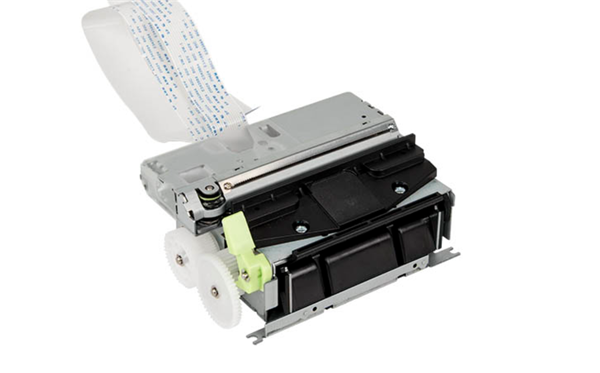
Close-up of a thermal printer mechanism used in kiosk terminals for printing tickets or receipts
You’ll find thermal printer mechanisms in more places than you might think.
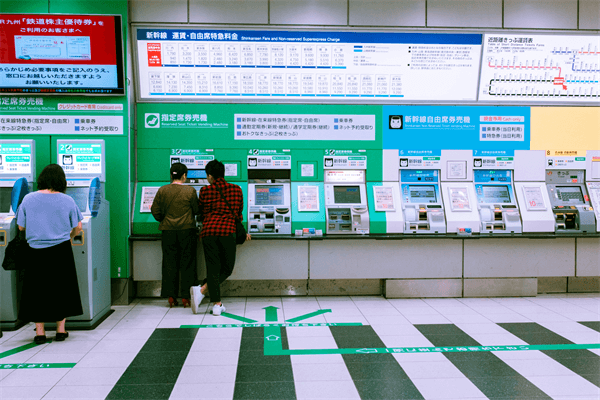
✔️Ticket kiosks at train stations and theaters print thousands of passes every day.
✔️Parking machines generate receipts and time slips automatically.
✔️Lottery and coupon kiosks rely on fast, accurate thermal printing to keep lines moving.
✔️Information terminals at hospitals or government buildings use them to issue queue numbers.
Each use case demands reliability—and that’s where a well-chosen thermal printer mechanism proves its worth.
Choosing the Right Mechanism Ensures Long-Term Reliability
Here’s the truth: a kiosk is only as reliable as its printer.
Selecting the right thermal printer mechanism means balancing print quality, speed, durability, and integration. Take time to match your kiosk’s needs—paper size, space, environment—with a mechanism that can handle daily use without fail.
In practice, the decision comes down to trust. Choose a manufacturer known for quality and long-term support. That partnership often determines whether your kiosk runs smoothly—or becomes a maintenance headache.
The key thing to remember is simple: reliable printing equals reliable performance.
And in the world of kiosks, that’s everything.