Warehouse Barcode Printer Connectivity: Wi-Fi vs Bluetooth vs Ethernet

Warehouse barcode printing depends on more than print speed and label quality. Connectivity directly affects uptime, scanning accuracy, deployment flexibility, and operational efficiency.
In modern warehouses, barcode printers are commonly connected through:
• Wi-Fi
• Bluetooth
• Ethernet (LAN)
• USB
• Cellular networks in some mobile deployments
Each option has strengths and limitations. Choosing the wrong connectivity method can lead to:
• printer disconnections
• delayed label printing
• roaming failures
• warehouse downtime
• failed WMS communication
• shipping bottlenecks
This guide explains how warehouse barcode printer connectivity works, compares Wi-Fi vs Bluetooth vs Ethernet barcode printers, and helps operations teams choose the right setup for different warehouse environments.
Why Barcode Printer Connectivity Matters in Warehousing
A warehouse barcode printer is part of a larger operational system that includes:
• WMS (Warehouse Management System)
• ERP platforms
• handheld scanners
• mobile computers
• shipping software
• access points and network infrastructure
If connectivity is unstable, the entire workflow slows down.
Common warehouse printing problems caused by poor connectivity include:
| Problem | Typical Cause |
| Delayed label printing | Weak wireless signal |
| Printer disappears offline | Roaming between access points |
| Duplicate labels | Print retry failures |
| Failed shipping labels | Network packet loss |
| Slow batch printing | Congested Wi-Fi |
| Mobile cart disconnections | Bluetooth range limitations |
Connectivity decisions should therefore be treated as infrastructure planning, not just printer setup.
Main Barcode Printer Connectivity Types
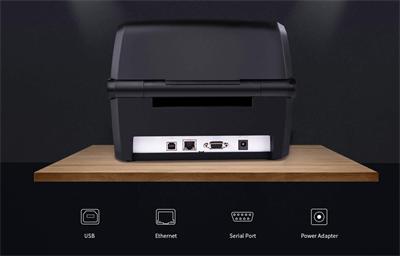
Most warehouse barcode printers support one or more of these connection methods:
| Connectivity Type | Best For | Stability | Mobility |
| Ethernet | Fixed industrial stations | Excellent | Low |
| Wi-Fi | Mobile warehouse operations | Good | High |
| Bluetooth | Short-range mobile printing | Moderate | Very High |
| USB | Single workstation printing | Excellent | None |
For ultra-large automated warehouses, Wi-Fi 7 and private 5G are emerging as future-ready options for lower latency, higher device density, and more predictable coverage. However, for most warehouses, Ethernet and enterprise Wi-Fi remain the practical mainstream choices.
Ethernet Barcode Printers
Ethernet barcode printers connect to the warehouse network through a wired LAN connection. They are best suited for fixed printing points such as packing stations, shipping desks, production lines, and automated print-and-apply systems.
Their biggest advantage is stability. A wired connection avoids most wireless problems, including signal drops, roaming failures, interference, and network congestion. This makes Ethernet ideal for high-volume or mission-critical label printing.
However, Ethernet limits mobility. Printers must stay near network ports, and deployment may require cabling, switches, and IT setup. For flexible or temporary warehouse layouts, Ethernet may be less convenient.
Best for: fixed workstations, shipping areas, production lines, high-volume printing, automation systems.
Wi-Fi Barcode Printers
Wi-Fi barcode printers connect wirelessly through warehouse access points. They are widely used in ecommerce fulfillment centers, mobile packing areas, inventory workflows, and warehouses where workstations move frequently.
The main benefit is flexibility. Printers can be relocated without network cables, which makes Wi-Fi useful for seasonal operations, mobile carts, and changing warehouse layouts.
The main risk is wireless instability. Large warehouses may experience weak signals, roaming issues between access points, interference from metal racks or machinery, and network congestion from scanners, tablets, and other devices.
Best for: mobile warehouse operations, flexible layouts, shared printers, ecommerce fulfillment, temporary workstations.
Bluetooth Barcode Printers
Bluetooth barcode printers are designed for short-range mobile printing. They are usually paired with a handheld terminal, tablet, or smartphone.
Bluetooth is simple to set up and useful for highly mobile tasks such as forklift labeling, inventory counting, field labeling, and receiving operations. It also works well for battery-powered mobile printers.
However, Bluetooth has limited range and is not ideal for shared warehouse printing. It is better for one-to-one device pairing than for centralized network printing.
Best for: mobile label printing, handheld workflows, forklift operations, short-range tasks, field use.
Wi-Fi vs Bluetooth Barcode Printers
Many warehouse operators compare Wi-Fi vs Bluetooth barcode printers when deploying mobile workflows.
The best option depends on operational requirements.
| Feature | Wi-Fi Barcode Printer | Bluetooth Barcode Printer |
| Coverage Range | Large facility coverage | Short range only |
| Mobility | High | Very High |
| Multi-User Support | Excellent | Limited |
| Network Integration | Strong | Moderate |
| Roaming Support | Possible | Not applicable |
| Setup Complexity | Moderate | Simple |
| Best Use Case | Warehouses | Mobile point tasks |
Recommended Connectivity by Warehouse Type
Different warehouse workflows require different levels of stability and mobility. Here's a quick guide.
| Warehouse Environment | Recommended Connectivity |
| Fixed shipping stations | Ethernet |
| Automated fulfillment center | Ethernet + Wi-Fi |
| Mobile inventory workflows | Wi-Fi |
| Forklift labeling | Bluetooth or Wi-Fi |
| Small warehouse | Wi-Fi |
| Industrial manufacturing | Ethernet |
| Temporary seasonal operations | Wi-Fi |
| Field operations | Bluetooth |
Frequently Asked Questions
Is Wi-Fi or Ethernet better for warehouse barcode printers?
Ethernet is generally more stable and reliable for fixed industrial printing stations. Wi-Fi provides better flexibility for mobile warehouse operations.
Are Bluetooth barcode printers reliable for warehouses?
Bluetooth printers work well for short-range mobile tasks but are usually not ideal for large centralized warehouse printing environments.
Why do warehouse Wi-Fi printers go offline?
Common causes include:
· roaming failures
· weak signal coverage
· RF interference
· network congestion
· poor access point placement
Can warehouse barcode printers share one network?
Yes. Enterprise barcode printers are commonly shared across multiple users and systems through LAN or Wi-Fi networks.
Final Thoughts
The best barcode printer connectivity for warehouses depends on operational design, mobility requirements, and infrastructure maturity.
In general:
· Ethernet offers maximum reliability
· Wi-Fi provides operational flexibility
· Bluetooth supports mobile point printing
Modern warehouses often combine all three technologies depending on workflow requirements.
For long-term scalability, connectivity should be planned as part of the warehouse system architecture rather than treated as a simple printer feature.
Recent posts
Previous article