How to Print UDI Labels Correctly: A Practical Guide for Medical Device Manufacturers

Regulators expect every medical device to be traceable, readable, and accurately identified throughout its lifecycle. The Unique Device Identification (UDI) system makes this possible. Yet many manufacturers still struggle with the practical side of producing compliant labels. This guide focuses on how to print UDI labels correctly—from choosing the right printer to validating barcode quality—so teams can meet global requirements without slowing down production.
Understanding UDI Requirements Before Printing
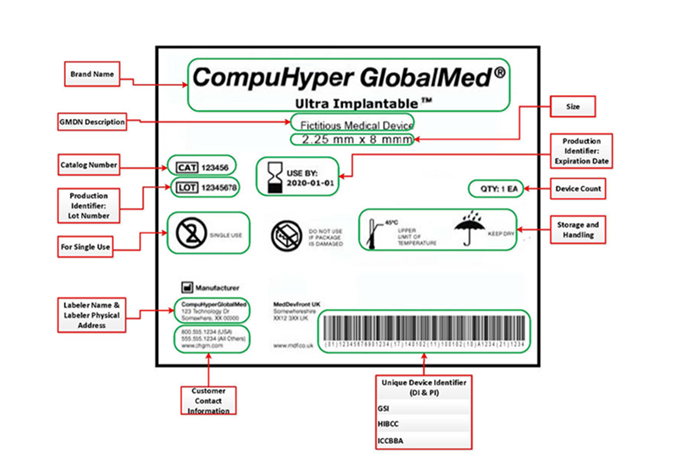
Image Source: U.S. FDA – UDI Basics
A UDI contains two core data elements:
• Device Identifier (DI): static, product-specific information.
• Production Identifier (PI): dynamic data such as batch number, expiry date, or serial number.
Most regulators—FDA, EU MDR, and China NMPA—require UDI to appear both in human-readable text and in a machine-readable barcode. The GS1 DataMatrix has become the dominant format for small medical labels thanks to its compact structure and strong error correction. Larger packaging may use GS1-128 or other approved formats.
Before printing anything, manufacturers must confirm:
• Which issuing agency applies (GS1, HIBCC, or ICCBBA).
• The data structure and application identifiers (AIs).
• The required font size and symbol size for each packaging level.
Clarity at this stage prevents costly redesigns later.
Choosing the Right Printer Technology for UDI Labels
The reliability of a UDI label depends heavily on the printer. Medical devices typically require high-contrast, abrasion-resistant barcodes, and not every technology can deliver this.
Thermal transfer printers remain the most consistent choice. They create dense, crisp symbols that survive sterilization, handling, and long-term storage. Manufacturers use 300 dpi printheads for most UDI labels and switch to 600 dpi when printing very small DataMatrix codes or micro-labels.
Direct thermal printers work for short-term logistics labels but rarely meet durability expectations for regulated products.
Criteria for selecting a UDI label printer include:
• Resolution (300/600 dpi)
• Ribbon type compatibility (resin for high durability)
• Print speed without loss of edge definition
• Consistent contrast across long runs
• Integration with labeling software and ERP/MES systems
Investing in the right printer avoids recurring quality issues and frequent reprints.
Selecting the Correct Label Materials for Medical Devices
A compliant UDI symbol must remain readable throughout the device’s intended use. This makes label materials critical, especially for sterile or moisture-exposed environments.
Common choices include:
• PET and PP labels: good resistance to moisture, chemicals, and tearing.
• Silver PET (“synthetic silver”): ideal for small surfaces with high durability requirements.
• High-temperature synthetic labels: suitable for autoclave cycles.
• Removable adhesives: used on reusable devices that require periodic re-labeling.
When evaluating materials, teams often test:
• Wiping resistance with alcohol and disinfectants
• Sterilization tolerance (steam, EtO, gamma, plasma)
• Long-term adhesion to metals, plastics, and curved surfaces
• Barcode degradation after handling and storage
Poor material selection leads to fading, peeling, or unreadable barcodes in real-world use—problems that can be avoided with upfront testing.
Setting Up Your UDI Barcode for Optimal Print Quality
Even with the right printer and materials, poor configuration can still ruin a barcode. Proper setup ensures every symbol prints sharply and scans reliably.
Key parameters include:
• Symbol size and module width: too small, and scanners fail; too large, and labels waste space.
• Quiet zones: essential to isolate the barcode.
• Darkness/heat level: too high introduces bleeding; too low causes broken lines.
• Print speed: slower speeds often yield cleaner edges.
• Ribbon-to-media compatibility: resin ribbons deliver the best contrast on synthetics.
When printing DataMatrix codes, operators should verify that the modules are square, evenly filled, and sharply edged. Smearing, hollow modules, or inconsistent cell density typically indicate incorrect heat settings or aging printheads.
Verifying UDI Barcode Print Quality
Regulators expect manufacturers to confirm that UDI symbols meet scanning and quality standards. Verification tools—distinct from regular barcode scanners—grade barcodes according to ISO/IEC 15415 (for 2D codes) or 15416 (for linear codes).
Verification typically evaluates:
• Edge contrast
• Modulation
• Axial non-uniformity
• Defects (spots, voids, speckles)
• Decode performance
• Grid alignment (for DataMatrix)
A passing grade ensures the barcode will remain readable across global supply chains and by different scanners. Manufacturers usually record verification results as part of their quality documentation.
A reliable UDI labeling process depends on disciplined control of data, materials, and print quality. When manufacturers combine durable media, high-resolution printing, and consistent verification, UDI barcodes remain readable throughout the device’s lifecycle. With a stable workflow in place, teams can meet global regulatory expectations and keep production running smoothly without compromising traceability.
Recent posts
Previous article