Migrating from 1D to 2D Barcode Printing: A Practical Guide for 2026
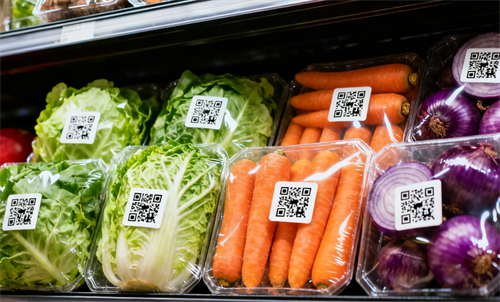
If you work in warehousing, logistics, or manufacturing, you’ve probably heard the talk: 2D barcodes are coming. They’re smaller, smarter, and—soon—mandatory.
GS1’s Sunrise 2027 program is pushing businesses to shift from traditional 1D barcodes to 2D codes that carry far more data. This isn’t just a compliance box to tick; it’s a quiet revolution in labeling.
Why Everyone’s Talking About 2D Barcodes
A 1D barcode tells you one thing: the product ID.
A 2D barcode—like a QR or DataMatrix code—can hold expiry dates, batch numbers, and even web links for traceability.
In practice, this means you can scan a single label and instantly know where an item came from, when it expires, and which pallet it belongs to. No database lookup. No guesswork.
GS1 expects retailers and supply-chain partners to support 2D scanning by 2027, and many big names are already testing. One grocery chain in Europe has started printing GS1 Digital Link codes on private-label items to trace recalls faster.
Another logistics company in Shenzhen uses 2D labels to track warehouse returns—cutting manual scanning time by nearly 40 percent.
1D vs. 2D: What’s the Real Difference?
Feature | 1D Barcode | 2D Barcode (QR/DataMatrix) |
Data Capacity | ~25 characters | 2,000 + characters |
Orientation | Must be flat | Can be scanned any angle |
Size | Long stripes | Compact square |
Data Type | ID only | ID + batch + expiry + URL |
Reader | Laser | Imaging scanner |
The key thing to remember is that 2D codes aren’t “new”—they’ve been used in pharmaceuticals and electronics for years. What’s new is the scale. They’re finally moving into everyday logistics, retail, and manufacturing.
Step 1: Audit Your Current Setup
Before you buy anything, list your current printers, label materials, and software.
Ask yourself:
Can my barcode printer handle 300 DPI or higher resolution?
Does my label design software support QR or DataMatrix?
Are my scanners still using laser tech?
If the answer to any of these is no, you’ll need upgrades.
Interestingly, many warehouses discover their existing thermal printers can print 2D codes after a simple firmware update. It’s worth checking first.
Step 2: Choose a 2D Barcode Printer
Any direct thermal or thermal transfer printer rated at 300 DPI or more can print readable 2D labels—if it has the right firmware.
Brands like Zebra, HPRT, TSC, and Honeywell already include 2D templates in their latest 2D barcode printer models.
If you print thousands of labels daily, invest in a high-speed industrial unit.
For mobile or retail setups, a compact 2-inch or 3-inch portable printer often works better.
Step 3: Update Your Label Software
This is where many companies stumble.
You’ll need a label design program that supports 2D formats and GS1 Digital Link syntax.
Both BarTender 2023 and NiceLabel 2024 include preset templates for QR and DataMatrix codes. Set up your fields once—batch number, expiry date, origin—and the software will populate them automatically from your ERP or WMS.
No more manual typing. No more duplicate data entry.
Step 4: Validate Labels and Materials
2D barcodes need clean contrast. Faded or glossy surfaces make scanners struggle.
Use coated matte paper or synthetic labels for durability in hot or cold environments.
Run test prints and verify scan quality using a verifier that grades against ISO/IEC 15415 standards. Aim for grade A or B—below that, your warehouse scanners may fail under fluorescent light.
Step 5: Train Your Team and Upgrade Barcode Scanners
2D codes require imager-based scanners instead of lasers.
Most new handhelds already support both 1D and 2D, but staff still need quick training: how to angle the scanner, check contrast, and verify readability.
A short 30-minute session saves hours of confusion later.
In one small distribution center, switching to imaging scanners reduced label scanning errors from 3 percent to nearly zero in the first month.
Step 6: Pilot First, Scale Later
Don’t roll out everything at once.
Pick one warehouse zone or one product line to test your 2D labels. Measure results—scanning time, error rate, and staff feedback.
When you’re satisfied, expand the rollout gradually.
This approach minimizes downtime and gives your IT team space to fine-tune label templates and integration scripts.
What About Costs?
Yes, migration costs money. A few new printers here, some scanners there. But the return is real:
• Fewer labeling errors (which often cost far more)
• Faster traceability during recalls
• Better data accuracy for your ERP or WMS
In many cases, the payback period is under 12 months. Think of it as upgrading from a flip phone to a smartphone—you don’t notice the old inefficiencies until you switch.
Integrating with ERP and Warehouse Systems
Here’s where 2D printing shines. Because each label carries more data, you can tie it directly to your ERP or warehouse management system.
Imagine scanning a code and instantly updating inventory, shipment status, and batch traceability. That’s not theory—it’s already happening in automated warehouses in Germany and Japan, where 2D labels feed real-time data into SAP and Oracle systems.
Beyond 2027: Smarter Labels, Smarter Operations
By 2027, most retail and logistics products will carry 2D barcodes. That milestone isn’t the end—it’s the beginning of smarter labeling.
2D codes are merging with RFID and smart packaging, turning simple labels into data tools that track, verify, and communicate in real time.
Upgrading from 1D to 2D printing isn’t hard. Audit, upgrade, test, train, scale. That’s it.
Start small. Move fast.
Soon, you won’t just print labels—you’ll print intelligence. Labels that think, connect, and keep your business moving forward.