Thermal Printer Mechanism Types & How to Choose the Right One
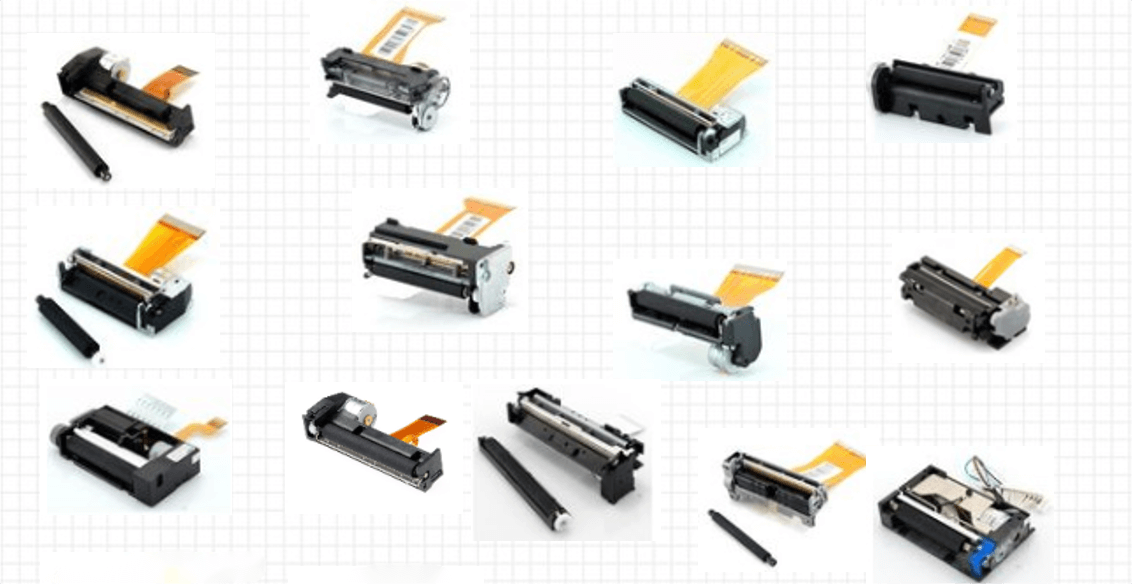
A thermal printer mechanism is the core engine of any receipt, ticket, or kiosk printer. Choosing the right type directly affects performance, integration, and reliability. And engineers must balance print width, voltage, paper path, cutter design and more. This guide breaks down the main thermal printer mechanism types and explains how to choose the right mechanism for your project.
Types of Thermal Printer Mechanism: Dimensions, Path, Voltage & Structure
For engineers developing kiosks, POS, and self-service systems, integration goes far beyond DPI or print speed. Real-world reliability depends on understanding electrical, mechanical, and structural distinctions—such as power specifications, paper loading design, and cutter options.
By exploring the main types of thermal printer mechanisms, you can make smarter, application-driven choices.
1 By Print Width: 2-Inch, 3-Inch, 4-Inch, Others
Print width is one of the most critical parameters in classifying a thermal printer mechanism, as it directly determines the amount of information that can be printed on each receipt, ticket, or label.
2-inch (58mm):
Common in mobile POS, handheld terminals, label printers, and compact devices. Its narrower format supports portability and space-saving designs.
3-inch (80mm):
Standard in retail receipts, kiosk ticketing, supermarket checkout systems. Offers more room for detailed printing like QR codes or multiple languages.
4-inch (112mm):
Widely used in logistics and warehousing as the standard for shipping labels and waybills. Also adopted in medical devices for reports and in ticketing where comprehensive data is required.
Others:
Specialized widths such as 6-inch or custom paper sizes appear in logistics, warehousing, or document printers.
Selection Tip:
Match width to content needs. 2-inch mechanisms fit simple transactions; 3-inch mechanisms handle richer formatting, branding, and regulatory data.
2 By Driver/Heater Voltage: 5V, 7.4V, 12V, 24V
Voltage compatibility is crucial for integrating a mechanism with the host system's power supply and controller logic. Different voltage categories influence print speed, heating efficiency, and printhead lifespan.
| Voltage Category | Voltage Range | Applications | Advantages | Considerations |
|---|---|---|---|---|
| Low Voltage | 2.7V – 7.2V (common: 5V or 7.4V) | Portable POS, handheld receipt printers, mobile label devices | Energy-efficient, compact, optimized for battery operation | Limited print speed and heating power |
| Mid Voltage | 4.2V – 8.5V (often 7.4V dual-cell Li-ion) | 2-inch & 3-inch mechanisms, kiosks, compact terminals | Balance of speed, portability, and durability | Requires careful power management in embedded systems |
| High Voltage | 12V ±10% | Kiosk printers, ticketing machines, self-service terminals, healthcare devices | Higher current, faster printing, supports wider paper | Needs stable regulated power; risk of printhead wear if overheated |
| Industrial Voltage | 24V ±10% | 4-inch label printers, logistics, warehousing, high-duty-cycle applications | Continuous high-speed printing, rugged performance | Higher cost and complexity; requires robust power supply design |
Selection Tip:
Always align mechanism voltage with system power rails. Using converters or level shifters increases complexity, cost, and reliability risks.
3 By Integration Method: Boardless vs Board Type
How you plan to integrate the thermal mechanism into your device matters—especially when choosing between "bare" printer mechanisms and board-integrated modules.
Boardless Mechanisms:
Includes only the printhead, motor, and sensors. You must design the drive electronics (MCU + driver board). This approach requires more expertise and higher upfront effort but delivers maximum flexibility, seamless integration, and lower unit cost at high volume.
Board Mechanisms (Module):
Bundles the mechanism with a control board that handles driving, communication, and power regulation. Standard interfaces like TTL Serial or USB make it nearly plug-and-play, reducing development time and complexity—ideal for kiosk, self-service, and projects with tight deadlines.
4 By Structure & Paper Loading Method
The mechanical structure and paper loading design affect maintenance, ease of roll changes, and overall device ergonomics.
Clamshell (Top-Loading):
This classic design, where the entire print unit hinges open like a clamshell, is revered for its simplicity and easy loading nature. It's ideal for tabletop devices like cash registers and label printers, where an operator has clear, open access from above to drop in a new paper roll. Its main constraint is the need for vertical clearance.
Front-Loading / Panel-Mount:
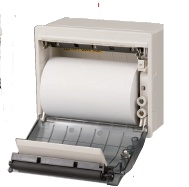
Built for seamless integration, this structure is the heart of any kiosk, self-service terminal, or embedded instrument. The mechanism is mounted vertically behind a panel, and paper is loaded through a front-access door or slot. This design preserves a clean product exterior and is essential for unattended or public-facing equipment.
5 By Paper Path Geometry: Curved vs Straight
Paper path geometry—whether straight or curved—impacts media feeding reliability and installation flexibility.
Curved Path:
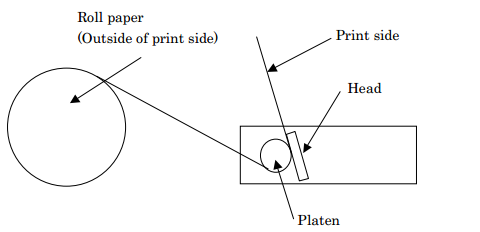
Wraps paper around a 45°–90° curve during printing. Compact and ideal for vertical setups like kiosks or vending machines, but may introduce more friction, increasing the chance of jams with thicker or low-grade paper.
Straight Path:
Allows paper to move linearly through the printer. Better for high-speed applications and long media rolls (e.g., ticket dispensers or logistics printers). Offers more stable feeding for thicker media or pre-cut labels.
Selection Tip:
If you're printing on specialty stock or require high throughput, a straight path might be the safer choice. For compact, all-in-one enclosures, curved paths can save space.
6 By Cutter Type: With or Without Auto Cutter
Many 3-inch and some 2-inch thermal printer mechanisms are available with optional auto cutters—either integrated or as modular accessories.
With auto cutter:
Great for unattended devices like kiosks, self-checkout terminals, or ticket machines where users need clean, separated receipts. Cutters can be full-cut or partial-cut depending on whether you want to fully separate the paper or leave a tab for grouping multiple slips.
Without auto cutter:
Simpler and more cost-effective. Ideal for portable devices or applications where paper is torn manually (e.g., handheld POS systems, small-scale printers).
Key Takeaways
There's no one-size-fits-all thermal printer mechanism. Each use case—whether it's a ticketing kiosk, handheld POS, or medical self-service device—demands a different balance of size, speed, voltage, and integration style.
Before making a selection, evaluate:
- • Physical constraints (space, loading access)
- • Power and control compatibility
- • Print volume and speed requirements
- • Maintenance expectations
By understanding the real-world trade-offs behind each mechanism type, you'll be better positioned to choose a thermal printing solution that fits your application—not just today, but throughout the product lifecycle.