Understanding Printhead Lifespan: What Affects Durability and How to Extend It
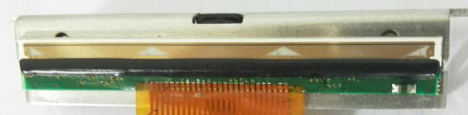
As part of any thermal printer mechanism , the printhead is one of the most critical—and costly—components. If you’re building printers for kiosks, POS systems, or label devices, knowing what impacts printhead lifespan is key to boosting performance and reliability.
Next, we will discuss what really determines how long a thermal printhead lasts, how to spot warning signs, and how to maximize its life in real-world use.
What Is a Printhead and Why Does It Wear Out?
A thermal printhead is the component that applies heat to thermal paper (or ribbon in the case of thermal transfer) to produce an image. It contains thousands of microscopic heating elements arranged in a line—often with 203, 300, or 600 dots per inch (DPI).
Over time, these heating elements degrade due to:
● Constant thermal cycling
● Abrasive contact with media
● Contaminants like dust, glue, or paper fibers
● Excessive heat or voltage
The result? Faded prints, missing lines, or complete failure. And once that happens, the only fix is replacement.
When integrating a kiosk thermal printer or mechanism into self-service devices, printhead longevity becomes even more critical, since accessibility and field servicing are often limited.
Key Factors That Affect Printhead Lifespan
1. Printing Technology: Direct Thermal vs Thermal Transfer
Direct thermal printing exposes the printhead directly to paper, increasing wear. Thermal transfer, by contrast, uses a ribbon that acts as a buffer—typically offering longer printhead life.
If your application requires high durability (e.g., label printers in logistics), thermal transfer might be the better route.
2. Print Speed and Voltage
Running the printer at max speed and voltage shortens printhead life. Faster printing generates more heat, which accelerates degradation of the heating elements. If your product prints high volumes continuously, consider thermal control logic or auto-throttling.
3. Media Quality
This is a silent killer. Low-quality or incompatible paper can contain debris, uneven coating, or excess adhesive—all of which act like sandpaper on the printhead.
Always source certified thermal paper or labels that match your print specifications. If you're designing a thermal printer for kiosk applications, also check compatibility with long-roll media.
4. Environmental Conditions
Dust, humidity, and temperature extremes affect both the printhead and the media. This is especially relevant for outdoor or semi-enclosed devices like vending machines, ATMs, or embedded receipt printers.
Design enclosures with adequate sealing and ventilation—and don’t overlook electrostatic protection.
5. Print Density Settings
Higher density = higher energy per dot = faster wear.
Many users crank up the density for darker prints, but this drastically reduces printhead durability. A well-calibrated balance between legibility and longevity is key.
How to Extend the Lifespan of a Thermal Printhead
✅ Clean the Printhead Regularly
Use isopropyl alcohol and lint-free swabs. Cleaning should be part of routine maintenance, especially for high-volume environments like ticketing terminals or public self-service kiosks.
Frequency: Every roll change, or every few thousand prints.
✅ Use the Right Driver Settings
Work with your firmware or middleware team to fine-tune:
● Print darkness
● Dot heating time
● Rest cycles (to cool the head during long print runs)
In most thermal printer integration guides, you’ll find recommended voltage and timing curves provided by the mechanism supplier—don’t ignore them.
✅ Implement Smart Firmware Logic
If you're working with an MCU or embedded board, build in a thermal safeguard algorithm:
● Reduce print speed or pause when overheating is detected
● Log usage data to anticipate maintenance
This is especially useful in thermal printer mechanism for embedded systems, where physical access to the hardware may be limited post-deployment.
✅ Choose the Right Thermal Mechanism
Thermal printer mechanisms may look similar—but they vary a lot in size, features, and integration complexity. Look for:
● High-quality printheads (with verified lifecycle ratings)
● Support for media sensors
● Firmware-ready integration with MCUs
● Proven use in your target environment (e.g., ticketing, logistics, kiosk)
Warning Signs Your Printhead Is Wearing Out
Watch for:
● Light or fading prints
● Incomplete barcodes or QR codes
● Horizontal white lines
● Overheating warnings
● Paper jams (caused by uneven head pressure)
If these symptoms occur early, you may need to revisit media selection, voltage settings, or paper feed alignment.
In Closing
A thermal printhead won’t last forever—but it can last a lot longer with the right choices. If you're building or sourcing a thermal printer mechanism, don’t treat the printhead as an afterthought. Think about cleaning access, driver support, and integration from day one.
Over time, that attention to detail pays off—in fewer failures, lower maintenance costs, and better end-user satisfaction.